
AI Mesh Segmentation
Upload a 3D model to automatically split it into logical parts - with optional printable joints for 3D printing
Only have a 2D image? Split it into parts first, then convert each part to 3D.
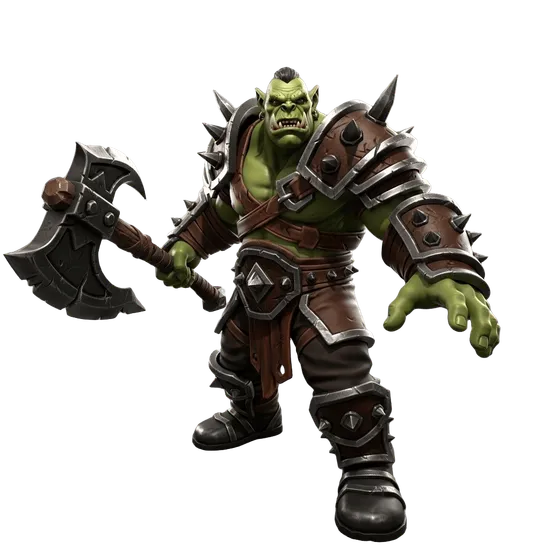
Drop your 3D model here or click to browse
GLB, STL or OBJ · up to 200 MB

AI Mesh Segmentation Tool for 3D Models
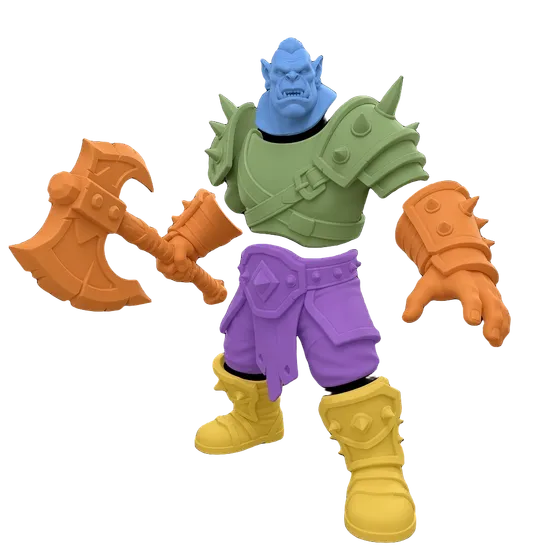
Automatically separate a 3D model into logical parts using AI. Upload a GLB file and the segmentation tool identifies and isolates distinct components like limbs, clothing, weapons, accessories, and structural elements - no manual selection required. The segmented model is saved to your Dashboard where you can view each part, toggle visibility, and download individual segments as separate GLB files. Models generated with Image to 3D or Text to 3D can be segmented directly from your Dashboard. This tool is for external GLB files from Blender, Maya, ZBrush, or other 3D software.
What Segmentation Enables
Game Development
Isolate character parts for customization systems where players swap armor, helmets, weapons, and accessories. Each segment becomes an independent object that can be shown, hidden, or replaced at runtime in Unity or Unreal Engine.
3D Printing
Separate a complex model into individually printable parts. Print large models in sections that fit your build plate, assign different materials or colors to each segment, and assemble after printing for multi-material results.
Selective Editing
Edit specific parts of a model without affecting the rest. Retexture just the head, adjust the proportions of one limb, or replace a single component while keeping everything else unchanged. Export modified segments and reassemble.
Asset Preparation
Break down complex models into organized component libraries. Build reusable asset kits where individual parts can be mixed and matched across multiple projects. Segment once, reuse the parts in any combination.
How AI Mesh Segmentation Works
The AI analyzes your model's geometry to identify natural boundaries between distinct parts. It recognizes structural features like joints between limbs and torso, separation between clothing and skin, and boundaries between attached objects like weapons or accessories.
The segmentation process examines surface curvature, mesh connectivity, and geometric features to determine where one logical part ends and another begins. Unlike manual selection in 3D software, the AI processes the entire model at once and produces consistent, clean boundaries between segments.
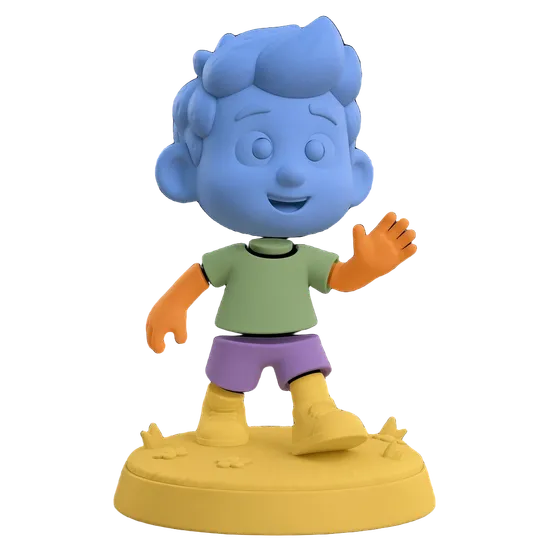
Each identified segment is assigned a unique color for visualization and exported as a separately addressable part within a single GLB file. You can then download the full segmented model or extract individual parts from your Dashboard.
For best results, upload models with a single continuous mesh and a single material slot. Models with multiple separate mesh objects or multiple materials may not segment as accurately. If your model needs cleanup before segmentation, run it through the Remesh tool first.
Tips for Best Segmentation Results
Model Preparation
Ensure your model is a single continuous mesh with one material slot. Models exported from sculpting tools like ZBrush may need to be merged into a single mesh in Blender before uploading. Clean, connected geometry produces more accurate segmentation boundaries.
What to Avoid
Models with multiple separate mesh objects, multiple materials, or non-manifold geometry may produce unexpected segmentation results. Very low-polygon models with fewer than 1,000 faces may not have enough geometric detail for the AI to identify distinct parts accurately.
Get Started
Upload a GLB file using the upload area above and click Start Segmentation. The AI will process your model in 90 to 120 seconds and save the segmented result to your Dashboard. Need a 3D model to segment? Generate one with Image to 3D from a photo or Text to 3D from a description. Create the perfect reference image with Image Studio. After segmentation, individual parts can be further processed with AI remeshing for clean topology or AI rigging for animation.
Frequently Asked Questions
What is AI mesh segmentation for 3D models?
AI mesh segmentation automatically separates a 3D model into distinct logical parts using artificial intelligence. Instead of manually selecting and splitting geometry in software like Blender, you upload a GLB file and the AI identifies and isolates individual components such as limbs, clothing, weapons, and accessories. The result is a segmented model with independently controllable parts.
How do I segment a 3D model into parts?
Upload a GLB file with a single mesh and single material slot, select the model version, and click Start Segmentation. The AI analyzes the geometry and automatically separates it into logical parts in about 90 to 120 seconds. The segmented model appears in your Dashboard where you can view, toggle visibility, and download individual segments.
What file formats does the segmentation tool support?
The segmentation tool accepts GLB files as input. Your model must have a single mesh and a single material slot for accurate segmentation. The output is a segmented GLB file saved to your Dashboard. For models in other formats like OBJ, FBX, or STL, convert them to GLB first using the remesh tool's format conversion feature.
What can I do with segmented 3D model parts?
Segmented parts can be independently shown, hidden, exported, and manipulated. Common uses include isolating character armor pieces for game customization, separating limbs for rigging, extracting individual components for 3D printing, and selectively editing specific sections without affecting the rest of the model. Each segment exports as a standalone GLB file.
Does mesh segmentation work with game engines?
Yes. Exported segmented GLB files work with Unity, Unreal Engine, Blender, and all major 3D software and DCCs. Individual segments can be imported as separate objects for independent animation, material assignment, and LOD management. This is especially useful for character customization systems where players swap armor, weapons, or accessories.
Can I segment AI-generated 3D models?
Yes, but models generated in 3D AI Studio via Image to 3D or Text to 3D can be segmented directly from your Dashboard for a smoother integrated experience. This standalone tool is designed for external models uploaded as GLB files from Blender, Maya, ZBrush, or other 3D software. Both workflows use the same AI segmentation engine and produce identical results.
Is the AI mesh segmentation tool free to use?
Mesh segmentation is available on paid plans and costs 15 credits per model. The tool is accessible from the Segmentation page for external GLB uploads, or directly from your Dashboard for models generated in 3D AI Studio. See the Pricing page for current plan details and credit allowances.